



































Build your own document intelligence pipeline

A self-serve API for developers to parse, extract, evaluate, correct, and deploy document AI applications.

IDP Forge

Extract the Data You Need, in the Format Your Workflow Demands

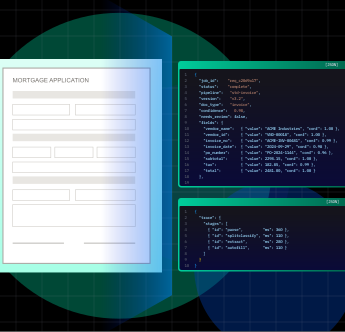
Get accurate, structured data from any complex documents, delivered in the exact JSON schema your workflow needs. Every field, table, and data point is extracted and organized into ready-to-use outputs

Extract Turns a Document into Data You Can Use

Getting from a PDF to a trustworthy record in your system usually means prompt engineering, JSON repair, validation code, confidence handling, and a way to show reviewers where each value came from. Extract does all of it in one stage. It reads the values in a document against a schema (fields, tables, figures and checkbox selections), validates them, and returns each one with a confidence score and its position on the page.

CORE CAPABILITIES / EXTRACT

Everything You Need to Get Structured Data out of Any Document

Extract runs specialised sub-stages for fields, tables, figures and selections, and only the ones your schema needs.

Schema Extraction

Pull named fields as text, long text, number, currency, date, boolean or enum.

Extract turns documents into trusted records, so the right data reaches your systems without manual keying

Accounts Payable and Invoice Processing

Invoices arrive with header fields and line-item tables. Extract captures both, checks that the total equals subtotal plus tax, and applies stricter thresholds to high-risk fields like total and bank account

Straight-Through Processing into Your Systems

Clean results flow into your ERP or database through a signed webhook, the API or Google Drive. Only the doubtful values go to a small review team

Line-Item Tables from Multi-Page Documents

Line items come out as rows with named columns across every page, ready to load into a spreadsheet or database

Forms with Checkboxes and Signatures

Read which boxes are ticked and whether a form is signed or stamped, alongside the typed fields on the same page

Exploring Documents Without a Schema

Run generic mode on a pile of unfamiliar documents to see every key-value pair, table and figure, then infer a schema from a sample and refine it

Audit-Ready Extraction with Page-Level Evidence

Every value has a bounding box and a page reference, so reviewers and auditors can see exactly where it came from

Pick the Right Engine for Every Sub-Stage

Each sub-stage in Parse has its own on/off switch, engine, model and optional confidence threshold. Use the engine that is strongest for each one, and change it later without writing code.

01

Choose the model for each sub-stage. The picker filters by Vision, Reasoning and Fast, and shows a relative cost tier from $ to $$$.

Layout
Vision Fast
$$
OCR
Fast Reasoning
$$$
Chunking
Fast Vision
$
02

Bring your own LLM keys. Use your own keys for the LLM-based sub-stages. Azure Document Intelligence usage is always billed in credits.

OpenAI key connected LLM stage
Claude key connected LLM stage
Azure Doc Intelligence credits
Billing note: Azure Document Intelligence is always billed in credits.
03

Built to recover. When a model call fails, the stage retries automatically (3 attempts with backoff) and rotates provider keys and deployments.

Model call failed
retry trigger
Try 1 Try 2 Try 3
Provider key rotated · deployment switched
auto recover
Stage completed successfully
recovered

EXTRACT / PROCESS FLOW

How Extract Works

Built to Plug into Your Stack

Submit a file to a parse-only pipeline with one call:

curl -X POST \
  https://api.us.idpforge.cloud/v1/jobs \
  -H "X-API-Key: $IDP_API_KEY" \
  -F "files=@policy-handbook.pdf" \
  -F "pipeline_id=$PARSE_PIPELINE_ID"

Frequently Asked Questions

Does it handle scanned and handwritten documents?

Scans and photos, yes. OCR runs on page images. Handwriting quality depends on the engine you choose (Azure Document Intelligence or a vision LLM). There is no separate handwriting mode.

‍

Do I get Markdown or JSON?

Both. You get JSON with whole-document Markdown, per-page Markdown and typed blocks. Post Processing can also render CSV.

Are tables preserved?

Yes. Tables are detected as table regions and output as Markdown tables.

Can I get bounding boxes?

Yes. Every block has a bounding box, expressed as percentages of the page.

Can I chunk for my vector database?

Yes. Choose semantic, page or fixed-token chunking, with configurable size and overlap.

Which OCR engine is used?

Azure Document Intelligence by default. You can select a vision LLM per pipeline.

Is there a page limit?

There is no hard page limit. The file size limit is 100 MB.

Can I use my own LLM key?

Yes, for the LLM-based sub-stages. Azure Document Intelligence usage is billed in credits.

How long is my data kept?

Jobs, results and documents are kept for 24 hours after submission, then deleted.

Build your first document AI workflow in minutes.